What families should know about fall detection devices for older relatives
Understanding fall detection devices and the elderly SOS button
When an older family member lives alone or spends time at home without immediate company, the worry about a fall or sudden medical issue is real. A fall can leave someone unable to reach a phone or call for help. That is where a personal emergency device, often called an elderly SOS button, becomes a practical tool. But what exactly does it do, and how can a family decide if it is the right choice?
A fall detection device is a small wearable unit that can sense when the wearer has fallen and automatically send an alert. Some models also include a button the person can press manually if they need help. The aim is simple: reduce the time between an incident and when help arrives. For families living in a different city or juggling work and care, this can bring some peace of mind. The technology has moved beyond the older pendant systems that required the person to press a button. Many modern devices now use sensors to detect the motion and impact of a fall without any action from the wearer.
How fall detection works in practice
Most fall detection devices use accelerometers and gyroscopes, the same kind of sensors found in smartphones that detect orientation and movement. When the device senses a sudden change in speed and angle, followed by a lack of movement, it triggers an alert. More advanced units also factor in altitude changes or impact force to reduce false alarms. The alert is then sent to a monitoring service or directly to family members via a mobile app or text message. Some devices, like the elderly GPS tracker from familyr.co.nz, combine fall detection with location tracking and two-way communication, so the person can speak to a responder even if they cannot move.
One key point is that not all falls look the same. A slow, sliding fall against a wall may not trigger a sensor the same way a sudden collapse does. For this reason, most devices still include a manual SOS button. This gives the wearer a backup option if they are conscious and able to press it. Families should know that no device is perfect. But having both automatic detection and a manual button increases the chances that help will be called in a variety of situations.
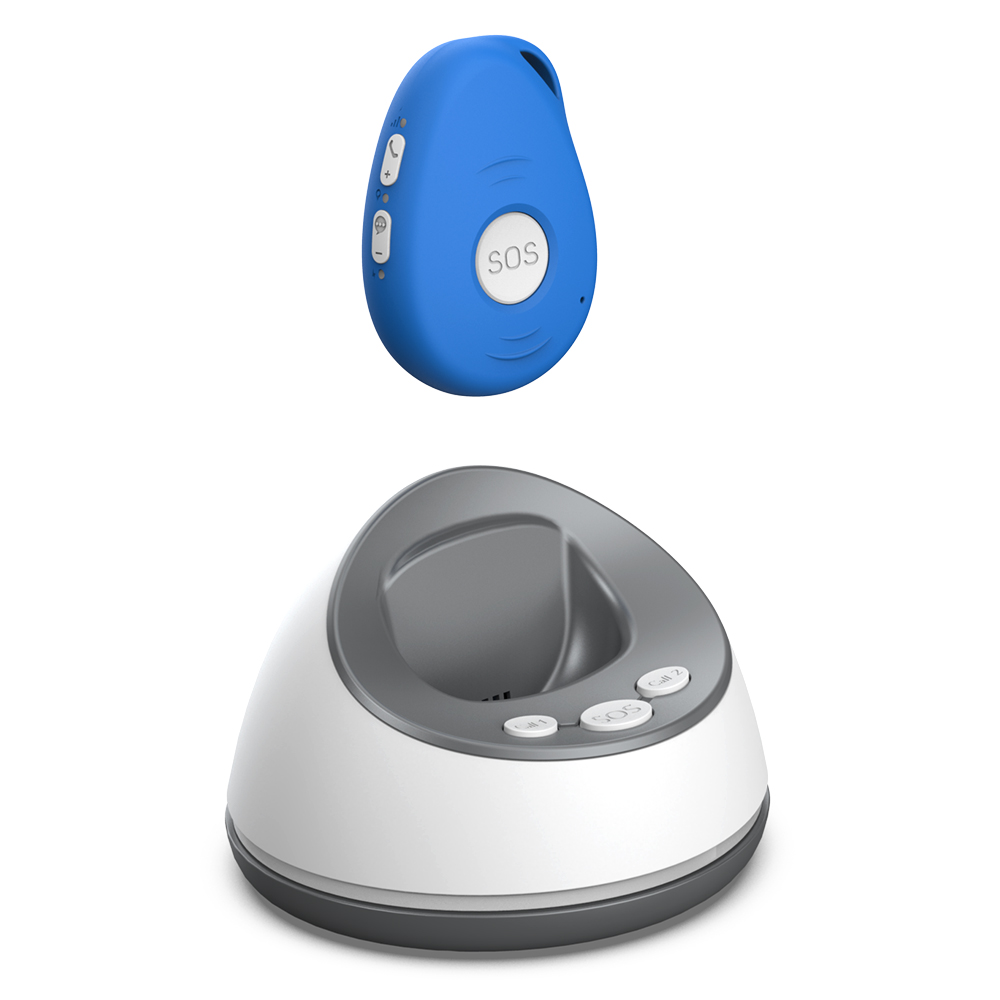
What to look for when choosing a device
There is no single best device for every older adult. The right choice depends on the person's lifestyle, health conditions, and living situation. Here are a few practical factors to consider:
- Wearability: If the device is uncomfortable or hard to remember, it will not be worn. Some come as pendants, others as wristbands or clips. A pendant can be worn under clothing and is less noticeable, while a wristband may be easier to put on and take off.
- Battery life and charging: Devices that need daily charging can be a burden. Look for units that last several days or weeks on a single charge. Some use replaceable coin cell batteries that last months.
- Range and connectivity: Some devices work only at home via a base station, while others use cellular or Wi-Fi networks and work anywhere. If the person gardens, walks the dog, or visits neighbours, a device with GPS and mobile connectivity is more useful.
- Response options: Does the alert go to a professional monitoring centre, to family members, or both? Some families prefer a direct alert to their phones so they can decide what to do. Others want a monitoring service that can dispatch emergency services if no one answers.
- Two-way communication: Being able to speak through the device allows the wearer to explain what happened and lets the responder assess the situation before sending help. This can reduce unnecessary ambulance callouts.
When comparing products, check whether the device requires a monthly subscription or a long-term contract. Some options, including the system from familyr.co.nz, operate without monthly fees, which can make them more predictable for a household budget.
Setting realistic expectations
A fall detection device is a useful safety net, but it is not a substitute for good home safety practices or regular health checks. Removing trip hazards, improving lighting, and installing grab bars in bathrooms still matter. The device works best when it is part of a broader plan that includes a list of emergency contacts, a first aid kit that is easy to find, and a routine check-in with family or neighbours. Mobility aids such as a walking stick or a walker can also reduce the chance of a fall in the first place.
It is also worth talking openly with the older relative about why a device is being considered. Some older adults may feel it signals a loss of independence. Framing it as a tool that helps them stay in their own home longer, rather than a sign of decline, can make the conversation easier. Involving them in the choice of device, letting them try it on and see how it works, often leads to better acceptance.

Potential downsides and how to handle them
No technology is flawless. False alarms can happen, especially if the device is knocked or dropped. Too many false alerts can lead to "alert fatigue," where family members or monitoring centres start to ignore them. Adjusting the sensitivity settings, if the device allows it, can reduce this problem. On the other hand, a device that is too insensitive may miss a real fall. Finding the right balance often takes a few weeks of use and some fine-tuning.
Another issue is that the wearer may forget to charge the device or put it on in the morning. A routine, such as placing the charger next to the toothbrush or putting the device on right after dressing, can help. Some families set a daily reminder call or text to check that the device is being worn. For those who are forgetful, a device with a long battery life and a low-battery alert that reaches family members can be a lifesaver.
There is also the question of privacy. A device that tracks location or listens to conversations can feel intrusive. Families should choose a device that only transmits data when an alert is triggered, rather than one that streams location continuously. Reading the privacy policy and asking the manufacturer what data is stored and for how long is reasonable.
Building a complete response plan
Having the device is only the first step. A response plan decides what happens after an alert. Who gets notified first? What if that person does not answer? Is there a backup contact? If the plan relies on a single family member who works during the day, a fall at midday might still lead to a long wait. Involving multiple family members or a neighbour can spread the responsibility. Some families also register with a local community service that can check on older residents.

For those who live in rural areas or away from immediate help, a device with two-way communication and GPS can be especially valuable. The wearer can tell the responder exactly where they are and what they need. The responder can reassure them while help is on the way. This combination of location and voice can cut through the confusion that often follows a fall.
Final thoughts
Choosing a fall detection device is a personal decision that depends on the older adult's habits, health, and home environment. There is no single solution that fits everyone. But understanding how these devices work, what they can and cannot do, and what practical steps to take before and after buying one can help a family make a confident choice. The technology has improved a great deal, and for many families, it offers a way to support an older relative's independence while staying connected in case of an emergency.